The Newsroom environment of Presscloud serves as a digital business card for your company. One important part of it is the Media Kit. Read in this blog about the Newsroom itself and how to best set up your Media Kit.
What is a Newsroom?
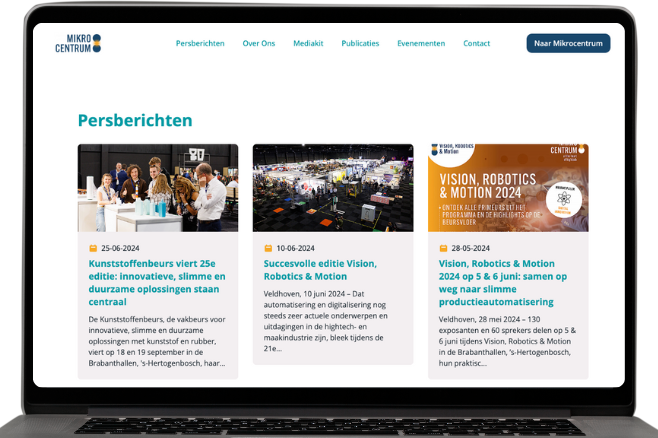
Taking a step back: what is the Newsroom? Simply put: the Newsroom is a collection point for all content relevant to the press. On this page, journalists find everything they need to know about your brand in one convenient overview. All press releases are located here, but you can also set up an 'About Us' page, where you share the founding story, your vision, and introduce your team to the world. In short: you give journalists a behind-the-scenes look.
In your Newsroom, you can also place previous publications. By showing what other journalists have written about your brand, you demonstrate that there is a story behind your brand, encouraging other journalists to create new publications.
Personalizing your own Newsroom is only possible if you have a subscription with Presscloud. Then you can tailor the content and even the colors to your liking. If you don't have a subscription, you only have a read-only version of the Newsroom: this will contain your press releases in our standard layout, but nothing more.
The Media Kit
Even though the above is already a nice application, one challenge remains: it can be difficult to send large files (like good photos and videos) via email. Fortunately, the Media Kit within your Newsroom offers a solution: in the Media Kit, you can share specific campaign content. By uploading all high-res photos and videos, the press has your campaign images in the highest quality. An added benefit is that you control the content, and the media do not have to look for images to accompany the press release.
Besides campaign images, you can also include images of the product, workplace, colleagues, software, or, importantly: the founders, in your Media Kit. Especially in small organizations, the latter is a nice addition: in this way, journalists have an immediate idea of the company, which can also open the door to potential interviews about the founding story or entrepreneurship itself.
Conclusion
A well-organized Newsroom and Media Kit are essential for an effective PR strategy. They make it easier for journalists to discover and understand your company and increase the chances of positive media attention. With Presscloud, you have all the tools to professionally and efficiently set up your Newsroom and Media Kit. Regularly update your Newsroom and ensure your brand is always ready for the spotlight.
Back to articles
The Newsroom: how to create a Media Kit?
The Newsroom environment of Presscloud serves as a digital business card for your company. One important part of it is the Media Kit. Read in this blog how to best set it up.
| Presscloud editorial
Small & large businesses trust Presscloud
Whether you are a sole proprietor, startup, or the communications advisor of a 3000+ employee company, Presscloud has the right solution for your communication needs.
3.012
Press Releases Sent
54.347
Publications
via Presscloud
via Presscloud
79.696
Journalists

The PR software from Presscloud is easy to use and the PR tips are handy. Thanks to Presscloud, you have control over the success of your PR campaigns.
Sebastiaan Smits
Head of Marketing at Orderchamp

Just one hour after we sent out the message via Presscloud, we were already called by Editie NL!
Thijs Janssen
Co-founder of Barqo

Presscloud taught me how to write a good press release. The tips and tricks from Presscloud really helped me to get the attention of the public!
Antoine Steenkamer
CEO of Mijnverkoopmakelaar.nl
All the tools you need to get into the media.
Presscloud AI Generator™
Need a topic? Outsource your press release? Write it in a jiffy.
Presscloud AI Press Lists™
Smart press lists & recommendations based on your press release
Newsroom
A page where the press can find all information about your company.
Media Database
All relevant journalists from newspapers, radio, TV and online media
PR CRM
Import and manage your own contacts and filter for relevance
Media Monitoring
Know which media your press releases are published in
Start working with PR?
Try Presscloud free for 14 days and discover how easy PR can be.
14-day free trial
No payment details required